
whk login | logout | whoami | uiwhk tail SOURCEwhk listen SOURCE --forward URL [--header 'Name: Value'] [--skip-verify]whk sources ls | create | get | update | rm | trash | restore | rotate-token | urlwhk destinations ls | create | get | update | rmwhk connections ls | create | update | rmwhk connect SOURCE DESTINATION [--filter JSON] [--transform JSON]whk events ls | get | replay | replay-bulkwhk dlq summary | ls | resendwhk stats overview | by-sourcewhk <command> --help prints every option of a command. A few rules apply
across all of them:
- A source can be named by its name, id or ingest token, and a destination by its name or id. Connections and trashed sources need the id.
--filter,--transform,--retryand a full--verifyor--authconfig take JSON inline, from a file as@rules.json, or from stdin as-.--sinceand--untiltake RFC 3339 timestamps such as2026-09-20T10:00:00Z.
Global flags
Section titled “Global flags”These work on every command.
| Flag | Variable | Effect |
|---|---|---|
--api-key <key> | WEBHOOKER_API_KEY | API key; overrides the saved config. |
--server <url> | WEBHOOKER_SERVER | API base URL; defaults to the saved config, then https://app.webhooker.eu. |
--json | Print the API’s JSON response instead of a table. |
Account
Section titled “Account”| Command | What it does |
|---|---|
whk login | Prompts for an API key, checks it and saves it. |
whk whoami | Prints the server, workspace, plan and a masked key. |
whk logout | Deletes the saved credentials. |
whk ui | Opens the terminal UI. A bare whk does the same on a terminal. |
Receive webhooks locally
Section titled “Receive webhooks locally”whk tail
Section titled “whk tail”whk tail stripe-prodPrints one line per event as it arrives: time, method, public id, content
type, size and the result of the signature check. The body stays on the server,
which makes tail the cheapest way to check that a provider is sending at all.


whk listen
Section titled “whk listen”whk listen stripe-test --forward http://localhost:3000/webhooks/stripeReceives each webhook in full and sends it to the local URL with the original
method, headers and body. Stop it with Ctrl-C.
| Flag | Effect |
|---|---|
--forward <url> | Local URL to forward each webhook to. Required. |
--header "Name: Value" | Extra header on the local request. Repeatable. |
--skip-verify | Also forward events whose signature check failed. |
--json | One JSON object per line, ready for jq. |
Every forwarded request carries an X-Webhooker-Event-Id header with the
event’s public id, so you can look the event up later with whk events get.
When the source verifies signatures, events that fail the check are not
forwarded and listen prints signature invalid; use --skip-verify. Usually
the secret stored on the source is wrong: fix it with
whk sources update <source> --verify stripe, or pass --skip-verify while
you debug.
Sources
Section titled “Sources”A source is one ingest URL. See Create a URL for the concept.
whk sources ls -q stripewhk sources create shopify-orders --verify shopify --color '#3b82f6'whk sources get shopify-orderswhk sources update shopify-orders --status pausedwhk sources url shopify-orderswhk sources rotate-token shopify-orderswhk sources rm shopify-orderswhk sources trashwhk sources restore <source-id>| Command | Notes |
|---|---|
ls | -q filters by name; --page and --limit page through. |
create <name> | --verify stripe|github|shopify prompts for the secret; --verify none turns checking off; JSON sets a full verification config. |
update <source> | --name, --description, --color, --status active|paused, --verify. |
url <source> | Prints only the ingest URL. |
rotate-token <source> | Issues a new ingest URL. The old one stops working within 30 seconds. |
rm <source> | Moves the source to the trash for 7 days. |
trash | Lists trashed sources. |
restore <id> | Restores a trashed source. Takes the id, since names only resolve to live sources. |
Destinations and connections
Section titled “Destinations and connections”A destination is an endpoint Webhooker delivers to. A connection routes a source to a destination, optionally through a filter and a transformation. Together they make a gateway.
whk destinations create billing-api \  --url https://api.example.com/webhooks/stripe \  --header 'Authorization: Bearer ...' \  --auth hmac --timeout-ms 10000
whk connect stripe-prod billing-api \  --filter '{"operator": "and", "rules": [{"path": "body.type", "op": "eq", "value": "invoice.paid"}]}'
whk connections ls --source stripe-prodwhk connections update <connection-id> --disable| Command | Notes |
|---|---|
destinations create <name> | --url is required. --header is repeatable. --auth hmac prompts for an outbound signing secret. Also --timeout-ms and --retry. |
destinations update <name> | Same flags plus --status active|paused. --header replaces the whole header set. --retry null resets the retry policy. |
destinations rm <name> | Deletes the destination. |
connect <source> <dest> | Short form of connections create --source --dest. |
connections update <id> | --enable, --disable, --filter, --transform. Pass null to clear a filter or transformation. |
connections rm <id> | Deletes the connection. |
The formats for filters, transformations and retry policies are in Filters and transformations and Retries and replay.
Events and replay
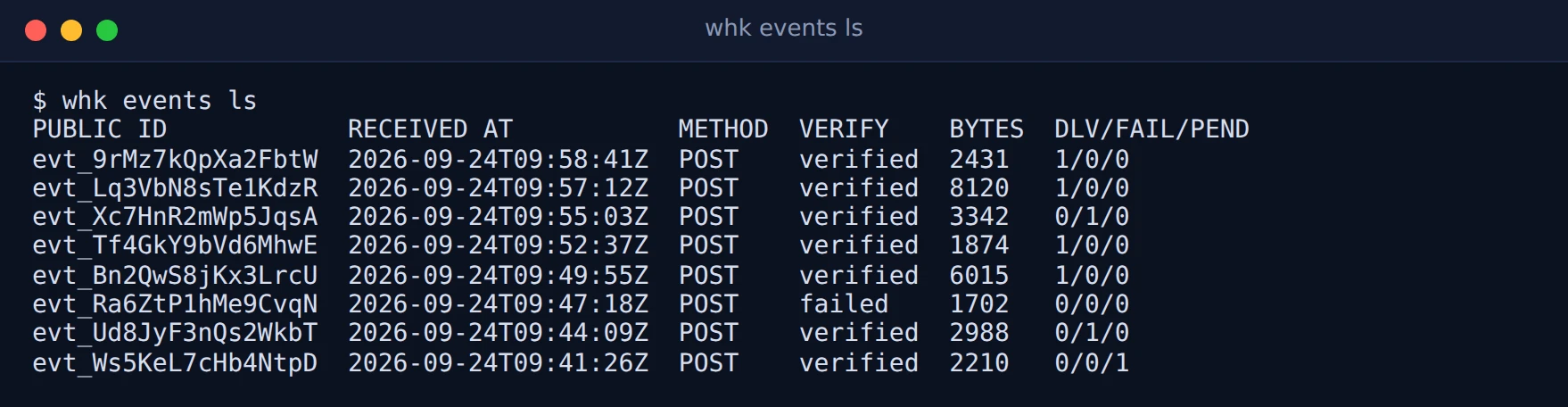
Section titled “Events and replay”whk events ls --source stripe-prod --status failed --since 2026-09-20T00:00:00Zwhk events get evt_9rMz7kQpXa2FbtWwhk events replay evt_9rMz7kQpXa2FbtWwhk events replay evt_9rMz7kQpXa2FbtW --connection <connection-id>whk events replay-bulk --connection <connection-id> --since 2026-09-22T08:00:00Z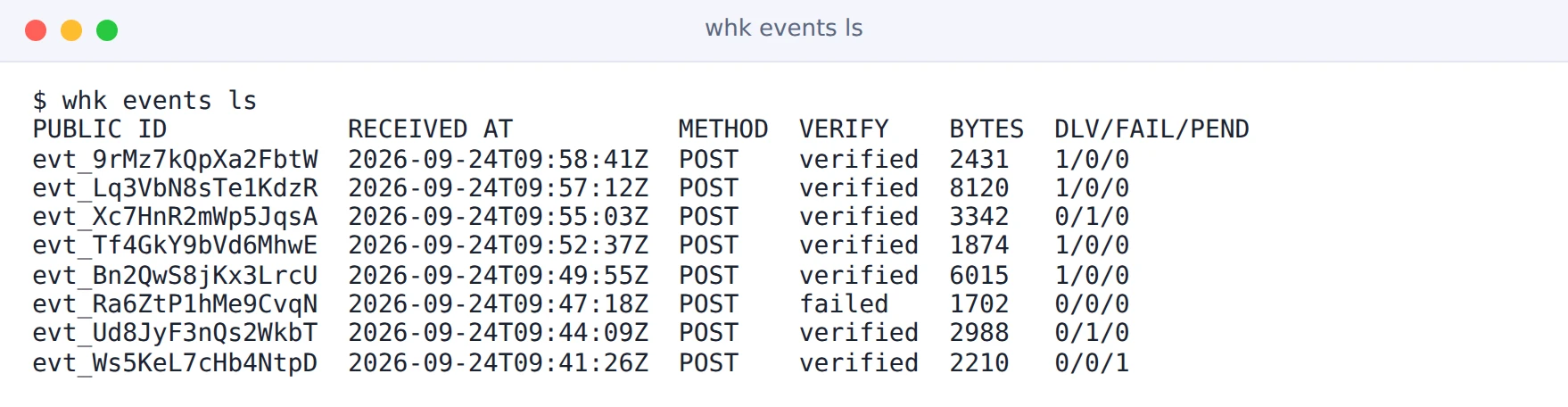
| Command | Notes |
|---|---|
events ls | Filters: --source, --status verified|failed|skipped (the signature check), --since, --until, -q on the public id. |
events get <event> | Headers, body and every delivery attempt. |
events replay <event> | Re-queues the event to every connection, or to the ones named with --connection (repeatable). |
events replay-bulk | Re-queues a range of deliveries on one connection. --status picks delivery statuses (default exhausted); --since and --until bound the range. |
replay-bulk is the command to reach for after an outage: point it at the
connection and the time the outage started, and every delivery that ran out of
retries goes out again.
Dead-letter queue
Section titled “Dead-letter queue”Deliveries that failed or used up their retries land in the source’s dead-letter queue.
whk dlq summary shopify-orderswhk dlq ls shopify-orders --status exhaustedwhk dlq resend --connection <connection-id>

| Command | Notes |
|---|---|
dlq summary <source> | Exhausted and failed counts per connection. |
dlq ls <source> | --status exhausted,failed (default both), --since, --until, -q on event id, destination or last error. |
dlq resend --connection <id> | Re-queues dead-lettered deliveries. --status defaults to exhausted. |
whk stats overview --since 2026-09-01T00:00:00Zwhk stats overview --source stripe-prod --source github-prodwhk stats by-sourceoverview prints event volume per bucket, deliveries by status, failed
attempts and end-to-end latency at p50, p95 and p99. by-source prints event
volume per source. Both take --since and --until, and overview also takes
--source (repeatable).