
Webhooker CLI: forward webhooks to localhost
whk is the official command-line client for Webhooker. Most people install
it to get webhooks onto their laptop: whk listen takes each webhook that
reaches your ingest URL and replays it against http://localhost:3000, or any
local URL, with the original method, headers and body. The CLI connects out to
Webhooker, so nothing on your machine is exposed and you don’t need ngrok or
another tunnel.
It also manages the workspace. Sources, destinations, connections, the event
log, replays, the dead-letter queue and delivery stats all have commands, so
the things you would click through in the dashboard also work in a shell
script or a CI job. Add --json and you get the raw API response.
Run whk with no arguments and it opens an interactive terminal UI
instead.
whk is a single static binary written in Rust, published under the MIT
license at github.com/webhooker-eu/webhooker-cli.
You need a Webhooker account and an API key to use it.
Install
Section titled “Install”The same one-line install, with a copy button for each platform, is on the Webhooker CLI page on webhooker.eu.
Install script
Section titled “Install script”On Linux and macOS:
curl -fsSL https://webhooker.eu/install.sh | shOn Windows, in PowerShell:
irm https://webhooker.eu/install.ps1 | iexThe script picks the build for your OS and CPU, checks it against the SHA-256
checksum published with the release and puts whk in ~/.local/bin
(%LOCALAPPDATA%\Programs\whk on Windows). It needs no root. To pin a release
or choose the directory:
curl -fsSL https://webhooker.eu/install.sh | sh -s -- --version v0.1.1 --dir /usr/local/binIn PowerShell, set $env:WHK_VERSION or $env:WHK_INSTALL_DIR before running it.
Download a binary
Section titled “Download a binary”Or download the archive for your platform from the
releases page,
unpack it and put whk on your PATH:
tar -xzf whk-x86_64-unknown-linux-musl.tar.gzsudo mv whk /usr/local/bin/whk --version| Platform | Archive |
|---|---|
| Linux x86_64 | whk-x86_64-unknown-linux-musl |
| Linux ARM64 | whk-aarch64-unknown-linux-musl |
| macOS Intel | whk-x86_64-apple-darwin |
| macOS Apple Silicon | whk-aarch64-apple-darwin |
| Windows x86_64 | whk-x86_64-pc-windows-msvc |
The Linux builds are statically linked against musl. They run on any distribution, Alpine included, with nothing else to install.
Build with Cargo
Section titled “Build with Cargo”With a recent stable Rust toolchain:
cargo install --git https://github.com/webhooker-eu/webhooker-cliLog in
Section titled “Log in”Create an API key in the dashboard, then run:
whk loginThe key is read without echo, checked against the API and saved to your user
config directory. whk whoami prints the workspace the key belongs to, which
is the quickest way to confirm it works.


A key belongs to exactly one workspace. To switch
workspaces, log in again with a key from the other one. whk logout deletes
the saved file.
Your first webhook on localhost
Section titled “Your first webhook on localhost”Four commands take you from nothing to a webhook hitting your local handler.
1. Create a source
Section titled “1. Create a source”Pass --verify stripe, github or shopify to check
signatures on arrival. You will be asked for the signing secret.
whk sources create stripe-test --verify stripe2. Give the ingest URL to the provider
Section titled “2. Give the ingest URL to the provider”whk sources url prints only the URL, so it pipes cleanly into other
commands:
whk sources url stripe-test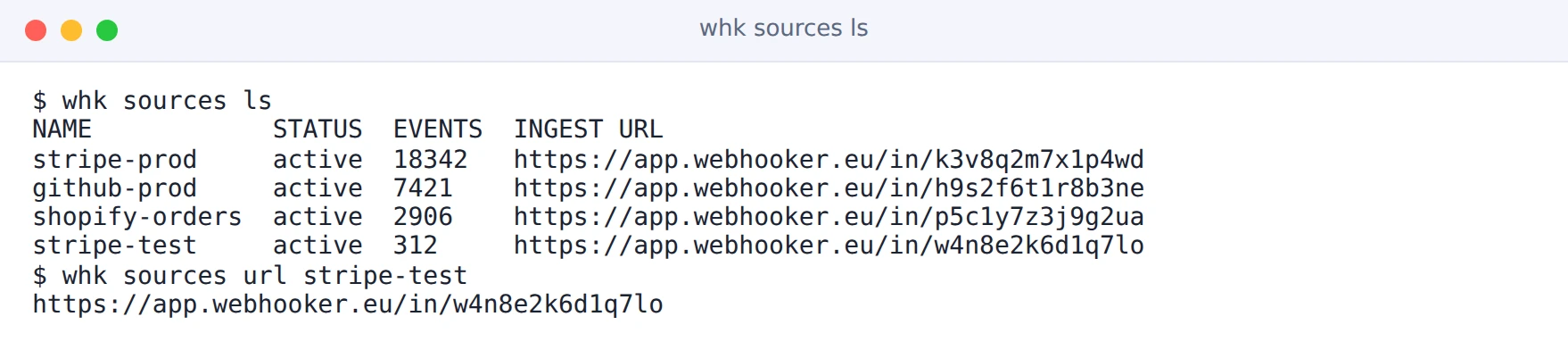
3. Forward to your handler
Section titled “3. Forward to your handler”whk listen stripe-test --forward http://localhost:3000/webhooks/stripe4. Send an event
Section titled “4. Send an event”Trigger one from the provider’s dashboard, or post to the ingest URL yourself:
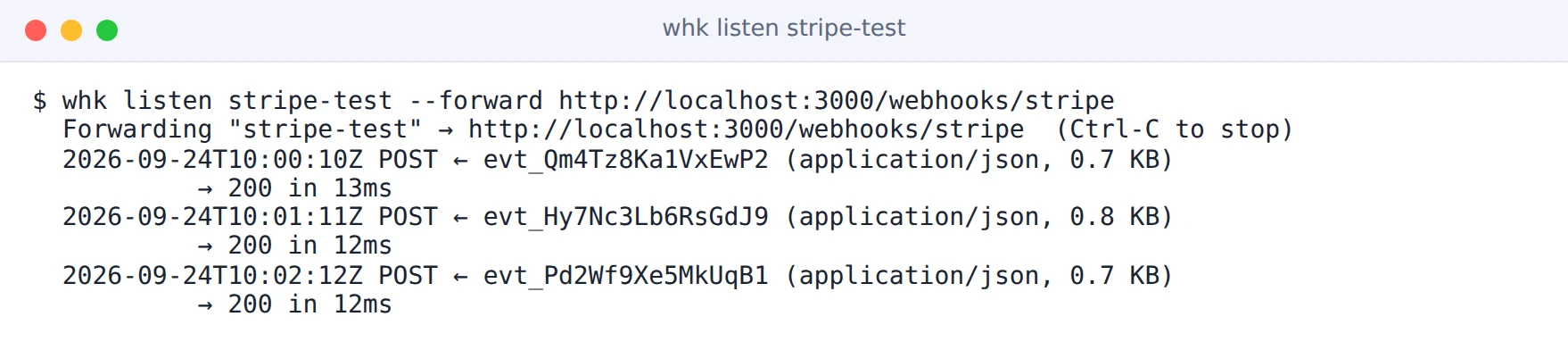
curl -X POST "$(whk sources url stripe-test)" \ -H 'Content-Type: application/json' -d '{"hello": "world"}'Each event shows up in the listen output with your handler’s status code and
response time:
The Test webhooks locally tutorial walks through the same flow with test-mode and production setups side by side.
Configuration
Section titled “Configuration”whk login writes the server and the API key to a TOML file:
| OS | Path |
|---|---|
| Linux | ~/.config/webhooker/config.toml |
| macOS | ~/Library/Application Support/webhooker/config.toml |
| Windows | %APPDATA%\webhooker\config.toml |
On Unix the file is created with mode 0600, readable only by your user.
Flags and environment variables take precedence over the saved file:
| Flag | Variable | Effect |
|---|---|---|
--api-key | WEBHOOKER_API_KEY | API key, whk_.... |
--server | WEBHOOKER_SERVER | API base URL. Defaults to https://app.webhooker.eu. |
--json | Print the API’s JSON response instead of a table. |
--verify and --auth hmac ask for a signing secret. On a terminal the
prompt hides what you type. Without one, whk reads the secret from
WHK_SECRET or from the first line of stdin, so it never hangs waiting for
input in a script.
Use whk in CI
Section titled “Use whk in CI”In a pipeline, set the key from your secret store and skip whk login:
export WEBHOOKER_API_KEY="$WEBHOOKER_API_KEY_FROM_SECRETS"whk events replay-bulk --connection "$CONNECTION_ID" --since "$OUTAGE_START"Add --json when a script reads the output. jq handles the rest:
whk sources ls --json | jq -r '.items[] | "\(.name) \(.event_count)"'Security
Section titled “Security”- An API key has full access to its workspace. Keep it in a secret store or
the saved config, not in scripts or shell history.
whk loginprompts without echo for this reason. whk listenonly opens outbound connections: one to Webhooker and one to the URL you pass to--forward. It never listens on a port.- Revoke keys you no longer use. The API keys page shows when each key was last used.
How do I receive webhooks on localhost without ngrok?
Section titled “How do I receive webhooks on localhost without ngrok?”Create a Webhooker source, give its ingest URL to the provider, and run
whk listen <source> --forward http://localhost:3000/your/path. The provider
sends to Webhooker’s public URL, and whk replays each request against your
local URL over an outbound connection. No port is opened on your machine and no
tunnel is involved. For a comparison with the tunnel tools, see
ngrok alternatives for webhooks.
Will my handler’s signature check pass on a forwarded webhook?
Section titled “Will my handler’s signature check pass on a forwarded webhook?”Yes. The body is forwarded byte for byte and the provider’s signature headers,
such as Stripe-Signature, X-Hub-Signature-256 and X-Shopify-Hmac-Sha256,
are passed through unchanged. Only transport headers like Host and
Content-Length are recomputed. Stripe signs a timestamp, so a request
replayed hours later fails Stripe’s tolerance check; forward live events while
you develop.
Do I miss events while whk listen is not running?
Section titled “Do I miss events while whk listen is not running?”No. Webhooker stores every event whether anyone is listening or not. Find the
one you need with whk events ls and replay it with whk events replay, or
resend it from the event log in the dashboard.
Can I use whk in CI?
Section titled “Can I use whk in CI?”Yes. Set WEBHOOKER_API_KEY from your CI secret store and skip whk login.
Every command accepts --json, so scripts get the raw API response instead of
a table.
How do I send signed test webhooks without the provider?
Section titled “How do I send signed test webhooks without the provider?”The webhook mock sender signs Stripe, GitHub and Shopify payloads with your secret and sends them to any URL, your ingest URL included.